

Trigger Agents automate journal entry creation based on business logic, responding to GL events in real time. Finance teams configure each agent in plain language, without engineering support, while retaining full control over every output through a structured human review process.
Finance teams have spent years building workarounds for systems that weren't designed to keep up with them. ERPs store the data, but they don't act on it. When a new journal entry hits the ledger, someone still has to decide what comes next: open a task, draft a follow-on entry, flag a discrepancy, or route a request.
That gap between recording and responding is where manual work accumulates. In multi-entity environments, where the same type of transaction repeats across subsidiaries with slight variations, the cost of that gap compounds quickly.
This is the problem Trigger Agents solve. By responding to activity in the general ledger and generating recommended accounting outputs automatically, they allow finance teams to move faster without sacrificing control. This article breaks down how they work, what activates them, and where they create the most impact.
What Is a Trigger Agent?
A Trigger Agent is a goal-driven system that monitors the general ledger and responds to predefined events by generating a recommended accounting output. It operates independently, without requiring manual prompts or data preparation, and surfaces a draft result for human review. Instructions are written in plain language, and the system gathers its own context directly from the GL.
The key distinction from traditional ERP automations is flexibility. Rule-based systems require code. This approach requires a description, the same kind of explanation a controller would give a new team member on their first day.
In Nominal, Trigger Agents live inside Close Management. Any configuration tagged as "Auto-trigger" follows this model, and every step is written in natural language that can be reviewed, adjusted, or extended without engineering involvement.
Recommended read: Inside Nominal's AI Agents: Embedded, Decision-Driven, and GL-Native
How a Trigger Agent Works: The 5-Step Flow
Understanding the mechanics helps finance leaders evaluate whether this model fits their workflows. The process follows five distinct steps.
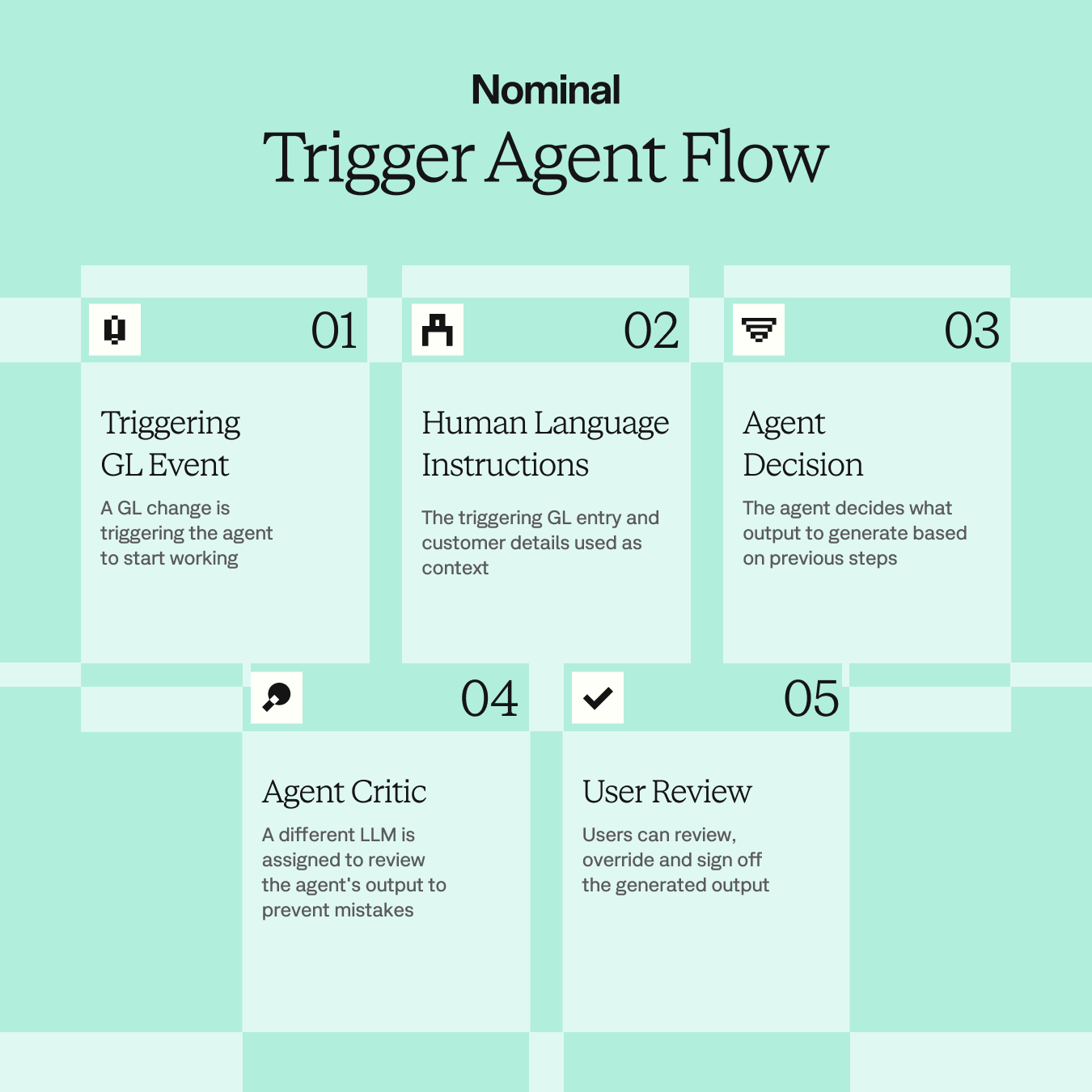
Step 1: Triggering GL Event
Every workflow starts with a GL event, the signal that sets the process in motion. Supported events include any new or updated object with a GL impact: journal entries, invoices, vendor bills, and payments all qualify.
The scope can be narrowed further: a new invoice for a specific customer, a journal entry updated with a particular cost center dimension, or a new entry posted to a defined account like legal expenses.
Think of it as an "if this, then that" model at the ledger level. When the specified condition is met, the workflow activates automatically.
Step 2: Plain Language Configuration
Once activated, the system receives the GL entry as input and processes it against a set of step-by-step instructions. These are written entirely in plain language, with no code and no formulas. Finance teams define the logic the same way they would document a process for a colleague, describing each validation, condition, and action in natural terms.
Because the system is directly connected to the ERP, it already has access to the chart of accounts, GL history, and transaction details, gathering the context it needs on its own rather than relying on someone to pre-filter or prepare the data.
Step 3: Agent Decision
The agent works through the instructions and makes independent decisions at each step. It can determine that a match was found and proceed, or halt the process if a condition is not met. If no matching accrual exists, or if the accrual was already reversed, the process stops. These branching decisions are defined in the instructions and executed autonomously.
Step 4: Agent Critic
Before any output reaches a human reviewer, a separate LLM is assigned to evaluate the work. This critical layer checks the proposed output for errors and validates that the result aligns with the instructions, adding a second layer of quality control that goes beyond what a single model pass would catch.
This step is a meaningful differentiator. It reduces the risk of a plausible but incorrect output, and it does so automatically, without adding any manual review burden.
Step 5: User Review
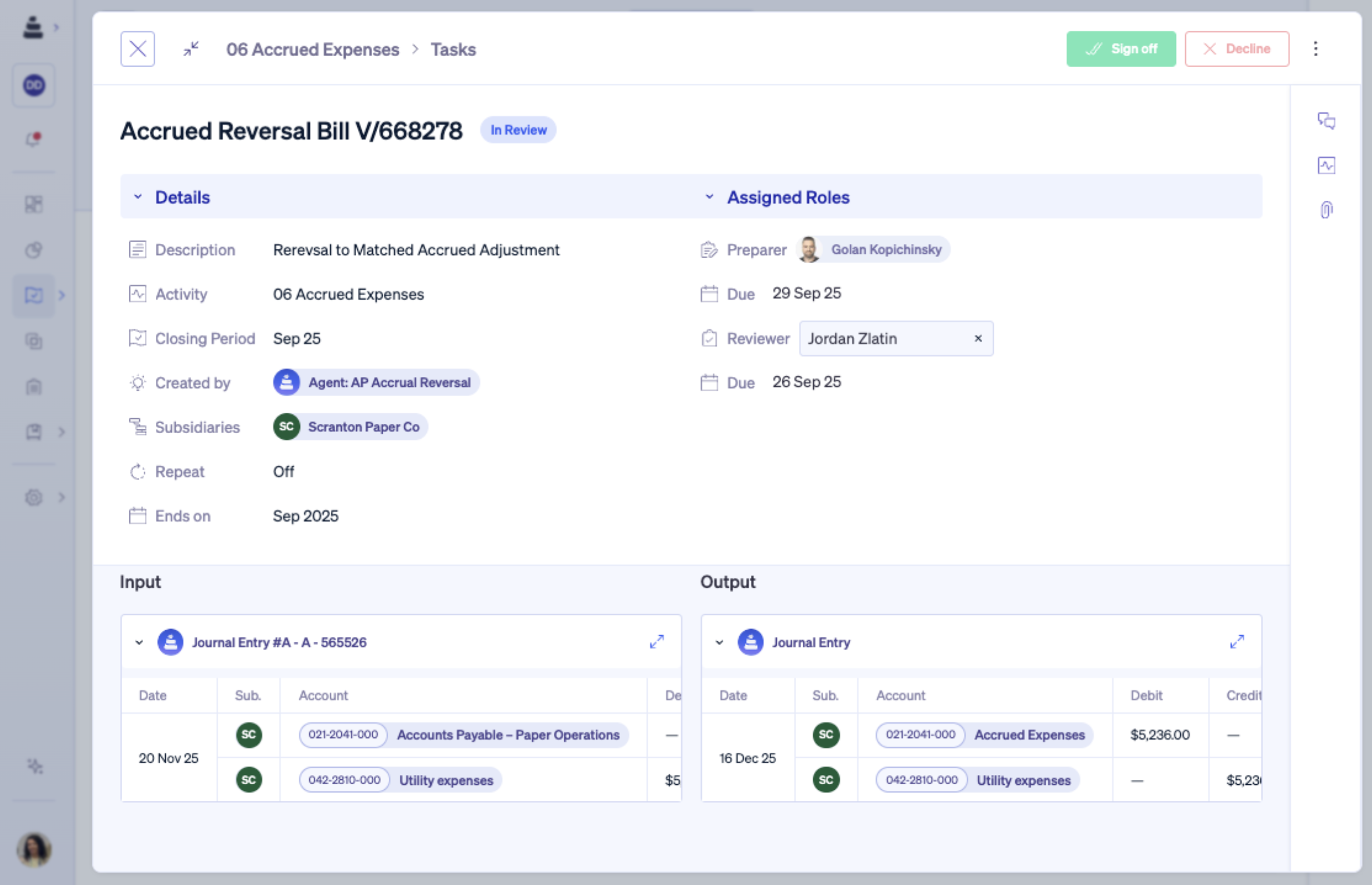
Once the critic confirms the output is valid, a review task is created in Nominal's Close Management module. The finance professional receives a side-by-side view of the input and the proposed output. They can approve, override, or decline. Only after sign-off does anything post back to the ERP.
Automation never bypasses review. Human judgment is always the final step.
Explore more on this topic: Inside the APM Category: The Three Components That Make Autonomous Finance Work
Three Use Cases Finance Teams Are Running Today
The following examples reflect configurations already in production. Each one targets a high-friction area of the close and shows how business logic, written in plain language, translates into automated, reviewable outputs.
AP Accrual Reversal
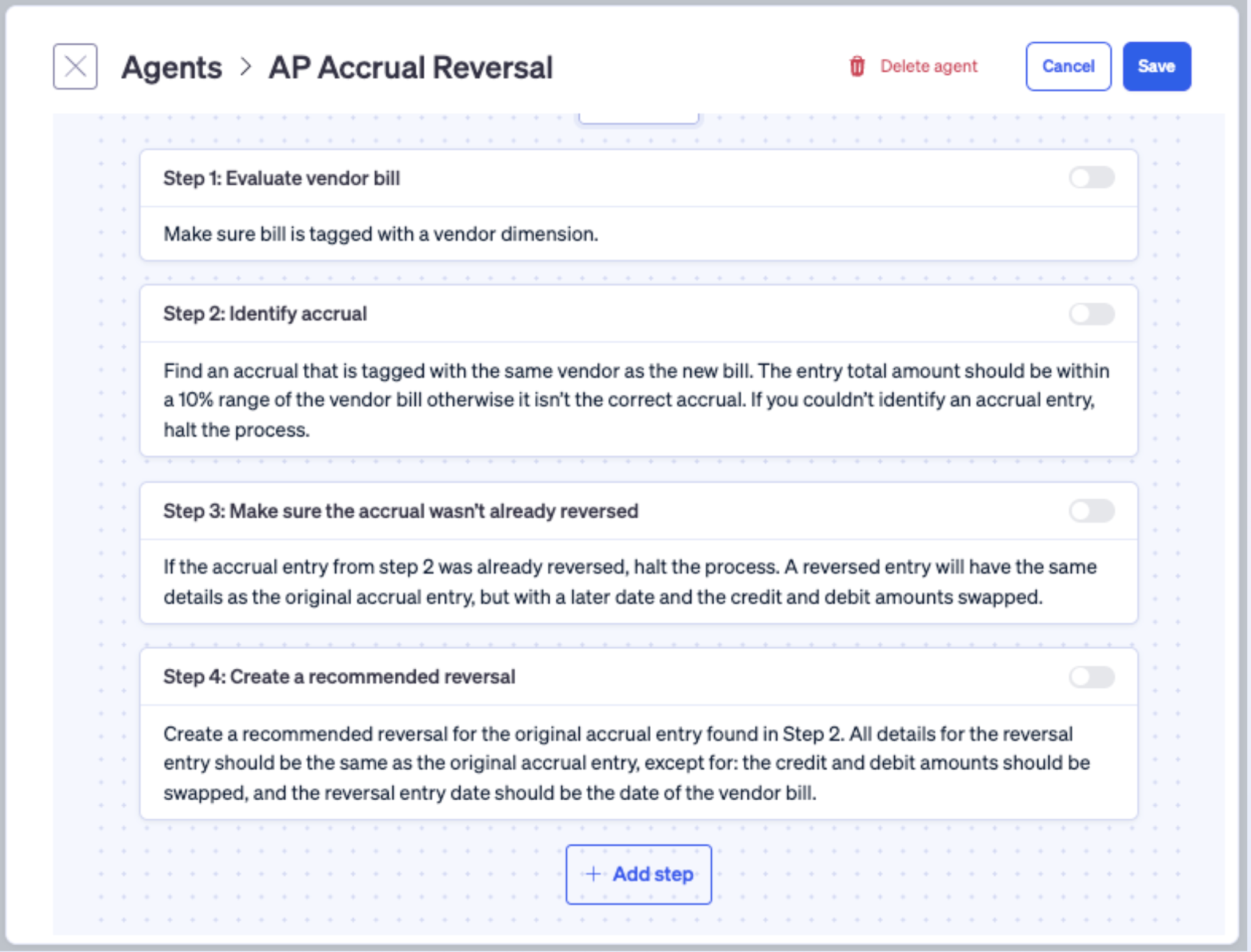
One of the most common configurations automates accrual reversals when a vendor bill arrives. The agent confirms the bill is tagged with a vendor dimension, searches for an accrual linked to the same vendor within a defined tolerance range, checks whether that accrual has already been reversed, and generates a recommended reversal entry if everything checks out.
Each condition is written in plain language. The 10% tolerance logic, the halt conditions, the reversal date rule: all of it is expressed as instructions, not code. Without this setup, the process requires someone to manually locate the original accrual, verify it has not already been reversed, and build the reversal entry from scratch.
Intercompany Transaction Creation
When a new draft journal entry is created, the agent scans for previous entries with similar characteristics and identifies the intercompany transaction it corresponds to, then generates a recommended output for review.
Finance teams managing multiple entities post intercompany activity frequently, and the manual process of matching drafts to historical patterns is time-consuming and error-prone. The agent handles the pattern recognition automatically, leaving the reviewer to confirm the output is correct.
Expense Reclassification
If a new entry hits a broad expense account but its description points to a more specific classification, such as inventory rather than general credit card expenses, the agent identifies the mismatch and generates a recommended reclassification entry. This is particularly valuable for teams managing high-volume accounts where reviewing every transaction manually is not practical.
How This Compares to Existing Approaches
Finance teams evaluating this model often ask how it differs from what they already have in place. The two most common points of comparison are ERP automations and general-purpose AI tools.
Versus ERP Automations and RPA
Rule-based ERP customizations require professional services to implement and maintain. Transformation projects can span years, and by the time they are complete, business requirements have often shifted. Nominal's Trigger Agents deploy in approximately two weeks, are configured by finance teams without outside help, and can be updated as quickly as editing a document.
Related post: The ERP Accounting Gap: What Mid-Market Finance Teams Need to Know
Versus General-Purpose AI Tools
A generic AI assistant cannot act on GL events independently. Replicating this workflow with a general-purpose tool would require manually providing full GL context, pre-filtering relevant transactions, and prompting the tool each time.
Nominal's platform is embedded directly in the ERP and equipped with finance-specific tooling that goes beyond natural language understanding. The system does not just recognize the word "reversal" in general terms; it knows what a reversal means in accounting and how to construct one correctly.
Control and Auditability by Design
Every recommended output is surfaced as a reviewable task, and nothing posts to the ERP without explicit sign-off. Finance professionals make the final call at every stage. Every action is traceable: who created the task, who reviewed it, who approved it, and what the instructions were at the time. The workflow is transparent by default, which matters for audit readiness and for any team operating under close scrutiny.
Rather than waiting for someone to notice that an entry needs a follow-on action, Trigger Agents detect the event and propose the next step automatically. Finance professionals spend less time on execution and more time on review and judgment.
For organizations managing complex, multi-entity accounting, that shift offers a meaningful improvement in close speed, consistency, and audit readiness, without requiring a lengthy implementation or engineering resources to maintain.
Ready to take manual journal entry work off your team's plate? Book a demo and see Trigger Agents running inside a real GL environment.